Radio Browser
The Radio Browser integrationIntegrations connect and integrate Home Assistant with your devices, services, and more. [Learn more] brings the worldwide directory of internet radio stations from Radio Browser into Home Assistant. It adds Radio Browser as a media source, so you can browse thousands of stations and play them on your media players, like a speaker in the kitchen or a Cast device in the living room.
There is no account and no API key to set up. The directory is free and community-maintained.
Prerequisites
To see stations near you under Local stations, set your home location in Home Assistant under Settings > System > General. Browsing all other categories works without it.
Configuration
To add the Radio Browser service to your Home Assistant instance, use this My button:

If the above My button doesn’t work, you can also perform the following steps manually:
-
Browse to your Home Assistant instance.
-
In the bottom right corner, select the
Add Integration button. -
From the list, select Radio Browser.
-
Follow the instructions on screen to complete the setup.
There is nothing to configure. The Radio Browser integration has no options, and you can add it only once.
Supported functionality
Radio Browser does not add any entitiesAn entity represents a sensor, actor, or function in Home Assistant. Entities are used to monitor physical properties or to control other entities. An entity is usually part of a device or a service. [Learn more]. Instead, it adds a media source you can browse from the media browser and from the Play Media action.
To listen to a station, go to Media > Radio Browser, then pick a station and choose the player to send it to:
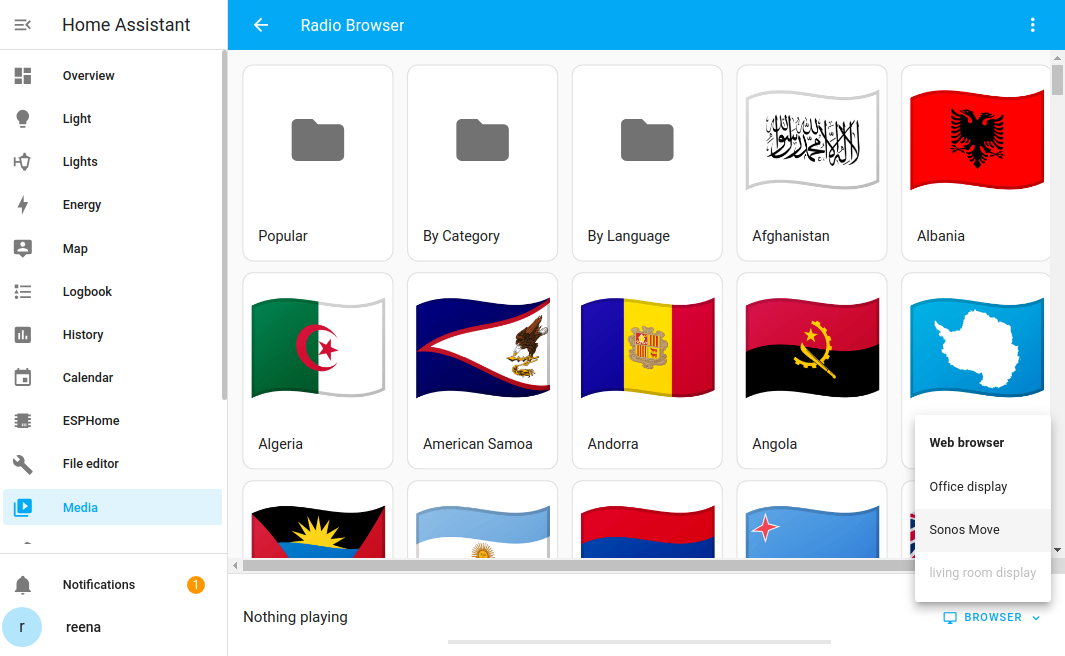
When you open Radio Browser, you can find stations in several ways:
- Popular: The most listened-to stations across the whole directory.
- By Category: Stations grouped by genre and topic tags, such as news, jazz, or classical.
- By Language: Stations grouped by the language they broadcast in.
- Local stations: Stations broadcasting close to your Home Assistant location.
- Country list: Stations grouped by country.
Examples
You can also start a station from an automation or script. The easiest way is to create the automation in the UI: add the Play Media action, browse the Radio Browser directory, and select a station. The station identifier is filled in for you. This lets you, for example, start your favorite station on the kitchen speaker every morning.
If you prefer to write the automation in YAML, you need the station’s UUID. To find it:
- Open the Radio Browser website.
- Search for the station you want.
- Select the station to open its details page. The UUID is shown on that page and is also part of the station’s URL.
Then use the UUID in the media_content_id:
action: media_player.play_media
target:
  entity_id: media_player.YOUR_MEDIA_PLAYER
data:
  media_content_id: >-
    media-source://radio_browser/963ccae5-0601-11e8-ae97-52543be04c81
  media_content_type: audio/mpeg
See the media player documentation for more options.
Data updates
Radio Browser does not poll in the background. The station directory is fetched live from the Radio Browser service each time you browse it, so you always see the current listings.
Removing the integration
This integration follows standard integration removal. No extra steps are required.
To remove an integration instance from Home Assistant
- Go to Settings > Devices & services and select the integration card.
- From the list of devices, select the integration instance you want to remove.
- Next to the entry, select the three dots
menu. Then, select Delete.