easyEnergy
The easyEnergy integrationIntegrations connect and integrate Home Assistant with your devices, services, and more. [Learn more] integrates the easyEnergy API platform with Home Assistant.
The integration makes it possible to retrieve the dynamic energy/gas prices from easyEnergy to gain insight into the price trend of the day and to adjust your consumption accordingly.
Companies that use the data from easyEnergy:
Configuration
To add the easyEnergy service to your Home Assistant instance, use this My button:

If the above My button doesn’t work, you can also perform the following steps manually:
-
Browse to your Home Assistant instance.
-
In the bottom right corner, select the
Add Integration button. -
From the list, select easyEnergy.
-
Follow the instructions on screen to complete the setup.
Supported functionality
Sensors
The easyEnergy integration creates several sensor entities for both gas and electricity prices.
Energy market prices
easyEnergy provides separate prices for electricity that you use (buy) and return (sell).
- The
current hourandnext hourelectricity market price - Average electricity price of the day
- Lowest energy price
- Highest energy price
- Time of day when the price is highest
- Time of day when the price is at its lowest
- Percentage of the current price compared to the maximum price
For electricity usage, an additional sensor counts the hours with a price equal to or lower than the current usage price. For electricity return, an additional sensor counts the hours with a price equal to or higher than the current return price. With this information, you could switch devices during the cheapest hours of the day, as illustrated in the graph below.
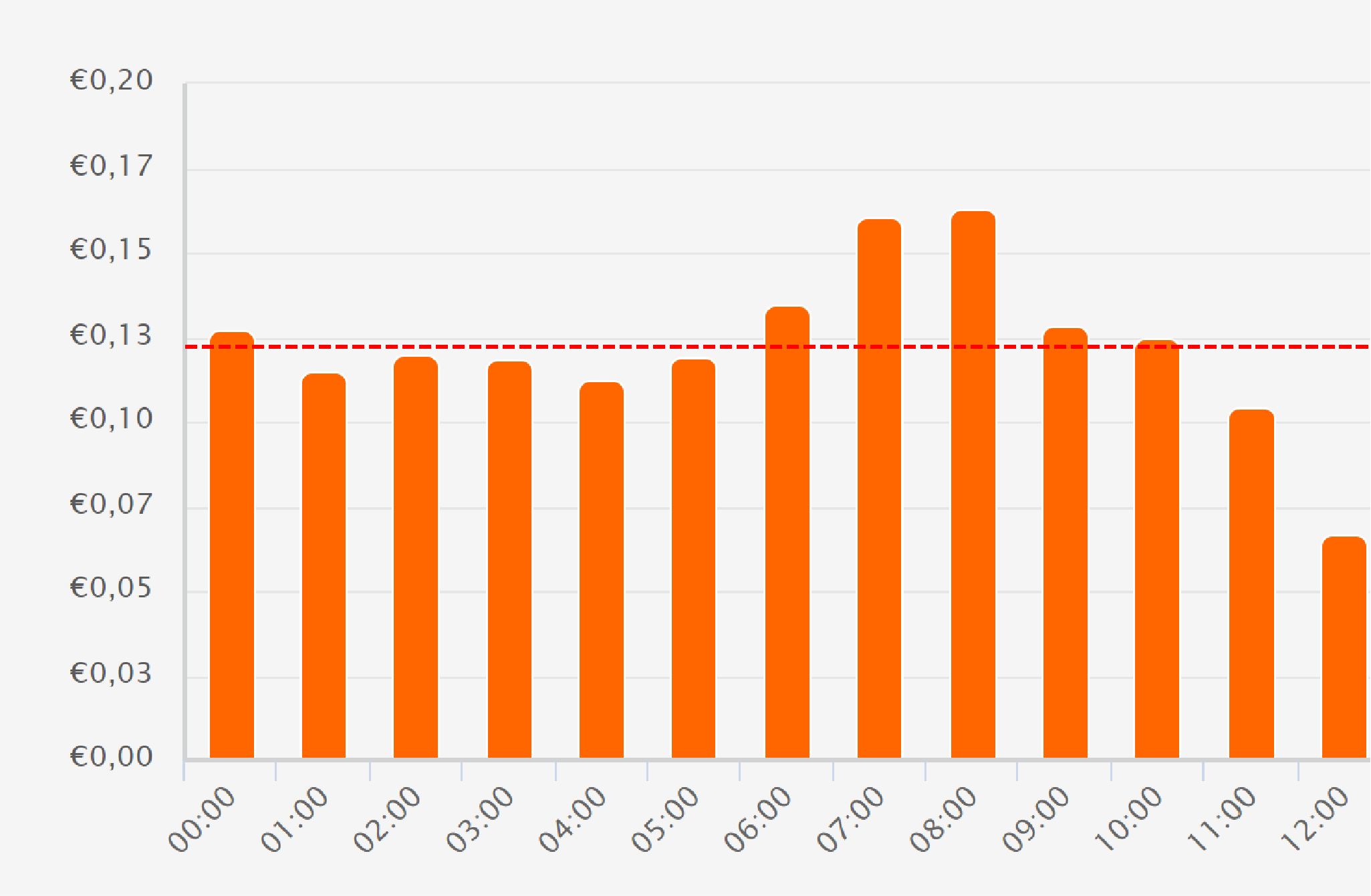 Example showing the energy price graph.
Gas market price
For the dynamic gas prices, only entities are created that display the
current hour and next hour price because the price is always fixed for
24 hours.
List of actions
The easyEnergy integrationIntegrations connect and integrate Home Assistant with your devices, services, and more. [Learn more] provides the following actions. Each link below opens a dedicated page with examples, parameters, and a step-by-step UI walkthrough.
-
Get energy return prices (
easyenergy.get_energy_return_prices) Requests energy return prices from easyEnergy. -
Get energy usage prices (
easyenergy.get_energy_usage_prices) Requests energy usage prices from easyEnergy. -
Get gas prices (
easyenergy.get_gas_prices) Requests gas prices from easyEnergy.
For an overview of every action across all integrations, see the actions reference.
Use cases
With the energy dashboard you can use the current hour price entity to calculate how much the electricity or gas has cost each hour based on the prices from easyEnergy. Or use one of the actions in combination with a template sensor to show the prices for today in a chart on your dashboard.
easyEnergy automation examples
These blueprints use the Current hour sensor on the easyEnergy Energy market price - Usage device. Set your price threshold in EUR/kWh; the sensor price includes VAT but excludes energy tax and purchase costs. Both blueprints run when the price crosses below the threshold. They do not run immediately if you enable them while the price is already below it. They can also run when price data becomes available again with a value below the threshold.
Automation: Send a notification when the energy price is low
Receive a notification when the electricity usage price drops below your chosen threshold. Select your easyEnergy price sensor and a notification entity when creating the automation. The message includes the current price.

Automation: Start a dishwasher when the energy price is low
Turn on a switch when the electricity usage price drops below your chosen threshold. For a dishwasher, choose a switch that starts its program; switching on the power supply alone may not start a cycle. You can also use this blueprint for another device controlled by a switch. The switch remains on when prices rise.
Templates
Create template sensors to display the prices in a chart or to calculate the all-in hour price.
Prices sensor with response data
To use the response data from the actions, you can create a template sensor that updates every hour. This example retrieves today’s all-in electricity usage prices at quarter-hour intervals. Replace YOUR_CONFIG_ENTRY_ID with your easyEnergy configuration entry ID.
template:
  - triggers:
      - trigger: time_pattern
        minutes: 0
    actions:
      - action: easyenergy.get_energy_usage_prices
        response_variable: prices
        data:
          config_entry: YOUR_CONFIG_ENTRY_ID
          incl_vat: true
          granularity: quarter
          price_type: invoice
    sensor:
      - name: Energy prices
        device_class: timestamp
        state: "{{ now() }}"
        attributes:
          prices: "{{ prices }}"
All-in price sensor
To calculate the all-in hour price, you can create a template sensor that calculates the price based on the current price, energy tax, and purchase costs.
template:
  - sensor:
      - name: easyEnergy all-in current price
        unique_id: allin_current_price
        icon: mdi:cash
        unit_of_measurement: "€/kWh"
        state_class: measurement
        state: >
          {% set energy_tax = PUT_HERE_THE_PRICE %}
          {% set purch_costs = PUT_HERE_THE_PRICE %}
          {% set current_price =
            states('sensor.easyenergy_today_energy_usage_current_hour_price')
            | float(0) %}
          {{ (current_price + energy_tax + purch_costs) | round(2) }}
Data updates
The integration will pollData polling is the process of querying a device or service at regular intervals to check for updates or retrieve data. By defining a custom polling interval, you can control how frequently your system checks for new data, which can help optimize performance and reduce unnecessary network traffic. [Learn more] the easyEnergy API every 10 minutes to update the data in Home Assistant.
Electricity prices for the following day and gas prices are published daily. You can retrieve published prices for a specific date using the actions.
Known limitations
The sensor prices are bare prices including VAT, however an energy company also charges other rates such as energy tax and purchase costs. The integration has no configuration option to add these values, but you could create a template sensor for this.
Troubleshooting
Prices for tomorrow are unavailable
Symptom: An action cannot retrieve tomorrow’s prices.
Description: Prices for the requested date may not have been published yet. See data updates.
Resolution:
Wait until easyEnergy has published the prices, then run the action again with start and end set to the same date in YYYY-MM-DD format. In YAML, quote the date values to keep them as strings.
The prices do not match my energy bill
Symptom: The price shown by Home Assistant is lower than the price charged by the energy company.
Description: The sensor prices exclude the additional costs described under known limitations.
Resolution: Create a template sensor that adds these extra costs to the current price. See the all-in price sensor example.
Removing the integration
This integration follows standard integration removal steps. If you also use the template sensors, you need to remove them manually.
To remove an integration instance from Home Assistant
- Go to Settings > Devices & services and select the integration card.
- From the list of devices, select the integration instance you want to remove.
- Next to the entry, select the three dots
menu. Then, select Delete.