Anthropic
The Anthropic integrationsIntegrations connect and integrate Home Assistant with your devices, services, and more. [Learn more] adds a conversation agent powered by Anthropic, such as Claude 3.5 Sonnet, in Home Assistant.
Controlling Home Assistant is done by providing the AI access to the Assist API of Home Assistant. You can control what devices and entities it can access from the exposed entities page. The AI can provide you information about your devices and control them.
Legal note: Individuals and hobbyists are welcome to use the Anthropic API for personal use, however, the use of the API is subject to their Commercial Terms of Service, regardless of whether you are an individual or representing a company.
Prerequisites
- This integration requires an API key to use, which you can generate here..
- This is a paid service, we advise you to monitor your costs in the Anthropic portal closely.
Generating an API Key
The Anthropic API key is used to authenticate requests to the Anthropic API. To generate an API key, take the following steps:
- Log in to the Anthropic portal or sign up for an account.
- Enable billing with a valid credit card on the plans page.
- Visit the API Keys page to retrieve the API key you’ll use to configure the integration.
Configuration
To add the Anthropic service to your Home Assistant instance, use this My button:

If the above My button doesn’t work, you can also perform the following steps manually:
-
Browse to your Home Assistant instance.
-
In the bottom right corner, select the
Add Integration button. -
From the list, select Anthropic.
-
Follow the instructions on screen to complete the setup.
Options
To define options for Anthropic, follow these steps:
-
In Home Assistant, go to Settings > Devices & services.
-
If multiple instances of Anthropic are configured, choose the instance you want to configure.
-
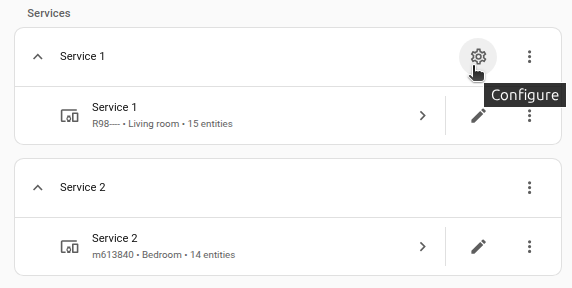
On the card, select the cogwheel
. - If the card does not have a cogwheel, the integration does not support options for this service.
-
Edit the options, then select Submit to save the changes.
The integration provides the following types of subentries:
Instructions for the AI on how it should respond to your requests. It is written using Home Assistant Templating.
If the model is allowed to interact with Home Assistant. It can only control or provide information about entities that are exposed to it.
If you choose not to use the recommended settings, you can configure the following options:
The model that will complete your prompt. See models for additional details and options.
The maximum number of tokens to generate before stopping. Note that our models may stop before reaching this maximum. This parameter only specifies the absolute maximum number of tokens to generate. Different models have different maximum values for this parameter. See models for details.
Optimize your API usage by allowing resuming from specific prefixes in your prompts. This significantly reduces processing time and costs in multi-turn conversations, but may increase cost for single-turn conversations. The cache duration is 5 minutes, the cache writes are billed at 1.25 times the base input tokens price, and cache read tokens are 0.1 times the base input tokens price. This means that the cache can reduce your costs and latency if you are likely to either call a tool to control your home, which also counts as a multi-turn conversation, or reply to the model with a follow-up. There are 3 caching strategies available, Disabled (if you often ask general-knowledge questions without follow-up), System prompt (caches system prompt and tools, useful if you often have short conversations like asking time or turning on lights), and Full (caches every user message, useful if you often have long conversations).
For models with extending thinking support, such as Claude 3.7 Sonnet, this parameter determines the maximum number of tokens Claude is allowed use for its internal reasoning process. Larger budgets can improve response quality by enabling more thorough analysis for complex problems, although Claude may not use the entire budget allocated, especially at ranges above 32K. Anthropic suggests starting at the minimum and increasing the thinking budget incrementally to find the optimal range for Claude to perform well for your use case. Higher token counts may allow you to achieve more comprehensive and nuanced reasoning, but there may also be diminishing returns depending on the task. Be prepared for potentially longer response times due to the additional processing required for the reasoning process. The value must always be less than the Maximum Tokens specified. If the value is below 1024, then extended thinking is disabled. This parameter is ignored if the model does not support extended thinking.
Newer models (starting from Claude 4.6) use the effort parameter, instead of the thinking budget, to control how many tokens Claude uses when responding, trading off between response thoroughness and token efficiency.
Enable the server-side Code execution tool. With this tool, the model can analyze data, perform complex calculations, run system commands, including writing code, in a secure, sandboxed environment.
Enable the server-side Web search tool for direct access to real-time web content, allowing it to answer questions with up-to-date information beyond its knowledge cutoff. Please note that this tool has its own pricing. With Claude Sonnet 4.5, Claude Opus 4.5, and newer, it is recommended to also enable Code execution to take advantage of dynamic filtering.
Limits the number of web searches that can be performed per user request. Once the limit is reached, no additional searches will be executed during that conversation.
The parameter allows you to localize search results based on the Home Assistant location.
Enable the server-side Web fetch tool to augment Claude’s context with live web content. The tool allows Claude to retrieve full content from specified web pages and PDF documents. Note that for security reasons, the web fetch tool can only fetch URLs that have previously appeared in the conversation context. This includes URLs in user messages, URLs in client-side tool results, and URLs from previous web search or web fetch results. This tool has its own pricing. With Claude Sonnet 4.5, Claude Opus 4.5, and newer, it is recommended to also enable Code execution to take advantage of dynamic filtering.
With this tool, instead of loading all tool definitions into the context window upfront, Claude searches the tool catalog and loads only the tools it needs. This may improve performance if you don’t need to control devices every time, or if you have a long prompt or many additional tools.
Supported features
Models
We generally support all Anthropic models, with one caveat: when a new model is released, it may introduce non-backward-compatible features, and it can take up to two Home Assistant releases for these features to be supported in the stable release.
Feature matrix
The following table describes which API features are supported and which are not. In general, we don’t support beta features.
Model capabilities
| Feature | Description | Status | Notes |
|---|---|---|---|
| Context windows | Up to 1M tokens for processing large documents, extensive codebases, and long conversations. | Supported | This is a basic feature, supported by default |
| Adaptive thinking | Let Claude dynamically decide when and how much to think. Use the effort parameter to control thinking depth. | Supported | Use the Thinking effort parameter to control the effort for 4.6+ models |
| Batch processing | Process large volumes of requests asynchronously for cost savings. Send batches with many queries per batch. Batch API calls cost 50% less than standard API calls. | Not supported | This feature does not apply to Home Assistant. There is currently no clear smart home use case for batch processing. |
| Citations | Ground Claude’s responses in source documents. With Citations, Claude can provide detailed references to the exact sentences and passages it uses to generate responses, leading to more verifiable, trustworthy outputs. | Not supported | We support receiving the citations but don’t currently display them in the interface |
| Data residency | Control where model inference runs using geographic controls. Specify "global" or "us" routing per request via the inference_geo parameter. |
Not supported | We might add support later, but it is not clear why you would need this in Home Assistant |
| Effort | Control how many tokens Claude uses when responding with the effort parameter, trading off between response thoroughness and token efficiency. Supported on Opus 4.6 and Opus 4.5. | Supported | Use the Thinking effort parameter to control the effort for 4.6+ models |
| Extended thinking | Enhanced reasoning capabilities for complex tasks, providing transparency into Claude’s step-by-step thought process before delivering its final answer. | Supported | Home Assistant displays the thoughts in the web interface since version 2026.4 |
| PDF support | Process and analyze text and visual content from PDF documents. | Supported | Use ai_task.generate_data action with attachments to use this feature |
| Search results | Enable natural citations for RAG applications by providing search results with proper source attribution. Achieve web search-quality citations for custom knowledge bases and tools. | Not supported | We receive the citations but they are not currently displayed in the interface. The response text itself usually provides sufficient information. |
| Structured outputs | Guarantee schema conformance with two approaches: JSON outputs for structured data responses, and strict tool use for validated tool inputs. | Supported | Use ai_task.generate_data action with response schema to use this feature |
Tools
| Feature | Description | Status | Notes |
|---|---|---|---|
| Code execution | Run code in a sandboxed environment for advanced data analysis, calculations, and file processing. | Supported | Use the Code execution parameter to enable |
| Web fetch | Retrieve full content from specified web pages and PDF documents for in-depth analysis. | Supported | Use the Enable web fetch parameter to enable |
| Web search | Augment Claude’s comprehensive knowledge with current, real-world data from across the web. | Supported | Use the Enable web search parameter to enable |
| Bash | Execute bash commands and scripts to interact with the system shell and perform command-line operations. | Not supported | This is a client-side tool, the bash is implied to be on the Home Assistant side, this could compromise the security and provides no real benefit over Code execution feature that uses a sandboxed environment instead. |
| Computer use | Control computer interfaces by taking screenshots and issuing mouse and keyboard commands. | Not supported | This is probably not applicable to Home Assistant use cases |
| Memory | Enable Claude to store and retrieve information across conversations. Build knowledge bases over time, maintain project context, and learn from past interactions. | Not supported | This is more like an SDK feature rather than an API feature. As such, it can be implemented as a third-party LLM API. |
| Text editor | Create and edit text files with a built-in text editor interface for file manipulation tasks. | Not supported | This is probably not applicable to Home Assistant use cases |
| Agent Skills | Extend Claude’s capabilities with Skills. Use pre-built Skills (PowerPoint, Excel, Word, PDF) or create custom Skills with instructions and scripts. Skills use progressive disclosure to efficiently manage context. | Not supported | This feature is still in beta |
| MCP connector | Connect to remote MCP servers directly from the Messages API without a separate MCP client. | Not supported | This feature is still in beta |
| Tool search | Scale to thousands of tools by dynamically discovering and loading tools on-demand using regex-based search, optimizing context usage and improving tool selection accuracy. | Supported | Use the Enable tool search tool parameter to use this feature |
| Files API | Upload and manage files to use with Claude without re-uploading content with each request. Supports PDFs, images, and text files. | Not supported | This feature is still in beta |
Context management
| Feature | Description | Status | Notes |
|---|---|---|---|
| Compaction | Server-side context summarization for long-running conversations. When context approaches the window limit, the API automatically summarizes earlier parts of the conversation. Supported on Opus 4.6 and Sonnet 4.6. | Not supported | This feature is still in beta |
| Context editing | Automatically manage conversation context with configurable strategies. Supports clearing tool results when approaching token limits and managing thinking blocks in extended thinking conversations. | Not supported | This feature is still in beta |
| Automatic prompt caching | Simplify prompt caching to a single API parameter. The system automatically caches the last cacheable block in your request, moving the cache point forward as conversations grow. | Supported | Set Caching strategy to Full to use this feature |
| Prompt caching (5m) | Provide Claude with more background knowledge and example outputs to reduce costs and latency. | Supported | Set Caching strategy to System prompt to enable caching for the system prompt and tools, but not for individual conversation messages, to keep Anthropic API costs low for typical Home Assistant smart home use cases |
| Prompt caching (1hr) | Extended 1-hour cache duration for less frequently accessed but important context, complementing the standard 5-minute cache. | Not supported | This is a more expensive version of prompt caching; it is probably not worth it for a smart home, but we might add this option in the future. Also, the chat session in Home Assistant expires in 5 minutes |
| Token counting | Token counting enables you to determine the number of tokens in a message before sending it to Claude, helping you make informed decisions about your prompts and usage. | Not supported | This is probably not applicable to Home Assistant use cases |
Availability
On start, the integration verifies the connection and validity of the API key, a config entry will not be loaded until this connectivity test succeeds. Additionally, there are periodic connectivity checks after startup. When the connection is considered to be broken, the conversation and ai_task entities will be shown as Unavailable until the connection is successful again. This does not prevent execution of the actions.
Use cases
The integration provides conversation and ai_task entities powered by Anthropic API. Please refer to the corresponding integrations for more details and examples:
A few examples:
Assist pipeline
Set up and configure Claude as a conversation agent in an Assist pipeline as described in the voice guide. You can then use this pipeline to chat through the Home Assistant web interface, on Android or Apple devices using the Home Assistant Companion App, or by voice using an Assist satellite.
Expose entities and configure aliases for the entities you want the model to control.
Home Assistant interface
You can set the Claude AI Task entity as the default AI Task entity. To do this, go to Settings > System > AI and select the Claude AI Task entity. This makes the Claude AI Task entity the default for blueprints, and for the Suggest with AI button in various places in the interface.
Automation
You can use conversation.process and ai_task.generate_data actions in your scripts and automations.
Here is a simple automation that implements a Claude Telegram chatbot using Telegram bot integration:
triggers:
  - trigger: state
    entity_id:
      - event.bot_update_event # Replace with your Telegram bot event entity
conditions: "{{ trigger.to_state.attributes.event_type == 'telegram_text' }}"
actions:
  - action: conversation.process
    data:
      agent_id: conversation.claude_conversation # Replace with your Claude conversation entity
      conversation_id: "telegram_{{ trigger.to_state.attributes.chat_id }}"
      text: "{{ trigger.to_state.attributes.text }}"
    response_variable: response
  - action: telegram_bot.send_message
    data:
      chat_id: "{{ trigger.to_state.attributes.chat_id }}"
      message: "{{ response.response.speech.plain.speech }}"
      parse_mode: plain_text
      config_entry_id: "{{ trigger.to_state.attributes.bot.config_entry_id }}"
Troubleshooting
The response is truncated mid-sentence, or the model said it would do an action to control a device but didn’t do it
This may happen when the Maximum Tokens to Return in Response integration option value is too small. A small conservative limit is good to keep the cost lower, but it may be suboptimal in certain cases.
Integration fails to set up, the logs show ImportError or AttributeError
This may happen if the Python anthropic client had failed to upgrade to the correct version. If you know how to log into the Home Assistant container and manually reinstall the client, try that. Otherwise, downgrading and re-upgrading Home Assistant should help.
Known limitations
This integration does not integrate with sentence triggers.
Removing the integration
This integration follows standard integration removal. No extra steps are required.
To remove an integration instance from Home Assistant
- Go to Settings > Devices & services and select the integration card.
- From the list of devices, select the integration instance you want to remove.
- Next to the entry, select the three dots
menu. Then, select Delete.